Layers in Designing — The Basics of How They’re Used That You Don’t Think About

When you log into Photoshop, Illustrator, Clip Studio Paint, or Krita and click “New Layer” do you think much about how it works?
I would definitely assume not — unless you’ve personally worked on the technical gist of developing these software’s, all you’re focused on is designing or painting what you want.
That’s what we’re gonna get into, what layers do we need to peel back about layers?
The Basics
Layers, “contain the images, text, or objects that make up a layered file,” that “let you move, edit, and work with content on one layer without affecting content on other layers.”
Alright, that was easy to define.
But did you know that layers were first used commercially by xRES?
Which is an image editing application by Fauve Software.
At least, that’s what a secondary source says on the Wayback Machine.
That’s right, before Photoshop used layers — though Photoshop 1.0 was first released in 1990 (which pre-dated xRES by 4–7 years), xRES most likely had first used layers for their photo-editing software!
Interesting right?
But while the dates are unclear on whether xRES or Photoshop were the first to use layers in a digital medium, there is someone who was the first in a physical medium to use them in photography editing.
Layers in History — its first use in Photography
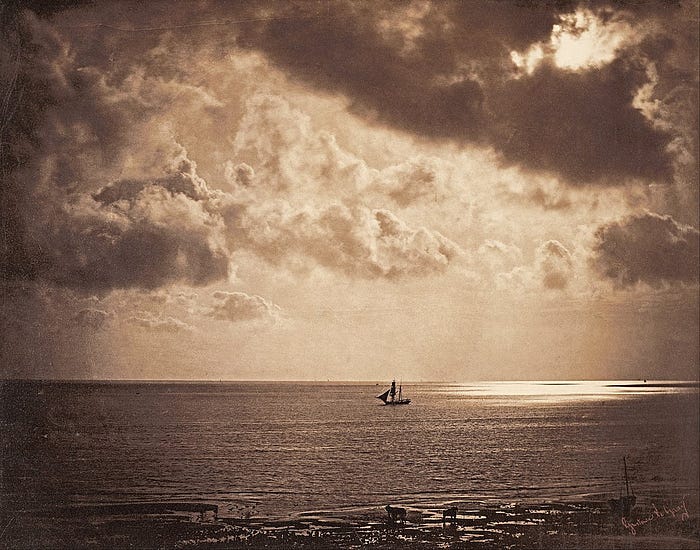
Image by Gustave Le Gray from Photocascadia
According to this “you may think it’s new but it’s not” edition by Photocascadia, Gustave Le Gray first coined this term for his work when he:
“Grew frustrated having to choose between the land and the sky in an image, which often meant leaving the sky pure white and overexposed. So, 170 years ago he solved this problem by creating the process of layering, or “combination printing” as he defined it at the time…”
Wow, so “combination printing” was the first instance of layering in photos!
So in fact, before the digital medium,
“…photographers have been manipulating images since the invention of the craft. Using the tools of an art allow us to expand and evolve our own work and the art itself.”
So there you go.
In fact, Gustave has contributed to many other inventions in photography, which you can read here.
With the use of combination printing in the physical medium, how are layers created in the digital medium?
How layers are created today
For some reason this information was fairly difficult to find, so if you have an interest in looking into this feel free to visit my source of information.
Now according to this website called Ahuka, layers are made with GIMP files that work similarly to the photography layering process by, well, layering.
The key is keeping files separately editable, which is the point of our work in Photoshop after all, but also for the GIMP native files used to code it.
Transparency is a key concept as well, since it’s used in Layer Masks for obscuring parts of an image. Transparency uses an Alpha Channel,
“In graphics, a portion of each pixel’s data that is reserved for transparency information. 32-bit graphics systems contain four channels — three 8-bit channels for red, green, and blue RGB and one 8-bit alpha channel. The alpha channel is really a mask. It specifies how the pixel’s colors should be merged with another pixel when the two are overlaid, one on top of the other.”
And also I want to note this,
“Typically, you wouldn’t define the alpha channel on a pixel-by-pixel basis, but rather per object. Different parts of the object would have different levels of transparency depending on how much you wanted the background to show through. This allows you to create rectangular objects that appear as if they are irregular in shape — you define the rectangular edges as transparent so that the background shows through. This is especially important for animation, where the background changes from one frame to the next.
Rendering overlapping objects that include an alpha value is called alpha blending.”
So… either creating layers from scratch in a digital medium is either pretty easy or super hard.
As someone who isn’t tech-savvy on using code or GIMP I can’t say for certain.
But it’s certainly worth looking into what makes our beloved photo-editing software’s tick.
Using them in your work
Layers are used in seemingly all things photo-editing!
In fact, it’d be hard to know a graphic designer or photographer not using it.
From seeing some examples on Dribble, there are endless both simple & complicated ways to use layers.
From adding small details, grouping them, and then arranging them in the background for texture:
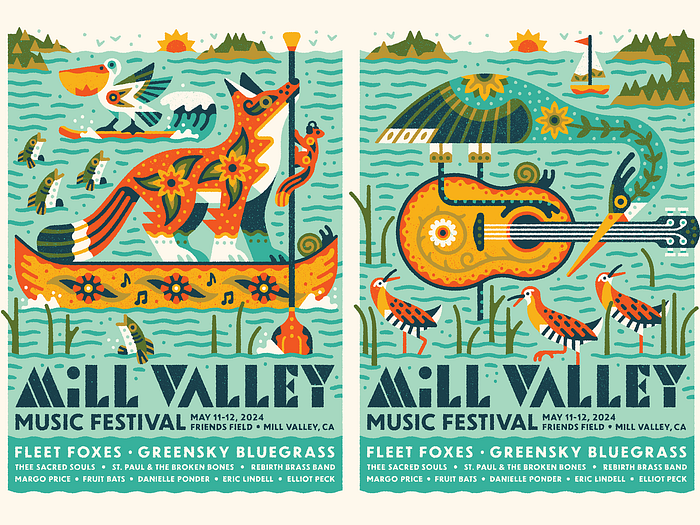
Or this clever use of shapes to create a minimalist style — and bringing shapes up front to appear as if behind an object.

Image by Darya Semenova from Dribble
Layers make everything easy for a designer, and help along with our perception of shapes for vivid imagery to take place.
Takeaway
Knowing what goes on behind-the-scenes & understanding how software is developed can help you in all aspects of your designer or painter life.
Not only does getting a gist of both spectrums help to troubleshoot easier, but especially in appreciating the software that helps you do so much creatively.
Also, maybe knowing this helps you to have a little patience before throwing your computer out the window when Photoshop suddenly crashes (it helped me).
I’m OJ, a college student studying remotely for my Graphic Design degree. I research topics for my own curiosity in design to share with others!